Check IESCO Bill Online 2026 – IESCO Bill Guide
Check IESCO Bill Online 2026 – IESCO Bill Guide
Haven’t received your IESCO bill, and the due date is approaching? Check your IESCO bill online conveniently instead. In this digital world, checking a bill online is easy and convenient. Check the IESCO bill online on the Islamabad Electric Supply Company website; they offer a system for checking, downloading, and printing the bill whenever you want, without visiting a nearby branch.
🔍 Check Your IESCO Bill
Enter your 14-digit reference number or Customer ID below
Methods to Check the IESCO Bill Online and Download
Check your bill online and get your IESCO duplicate bill within a few seconds. You can easily check your bill using the reference number and customer ID. Just enter your 14-digit reference number, and you don’t need to create a new account.
Step 1: Locate Your Reference Number
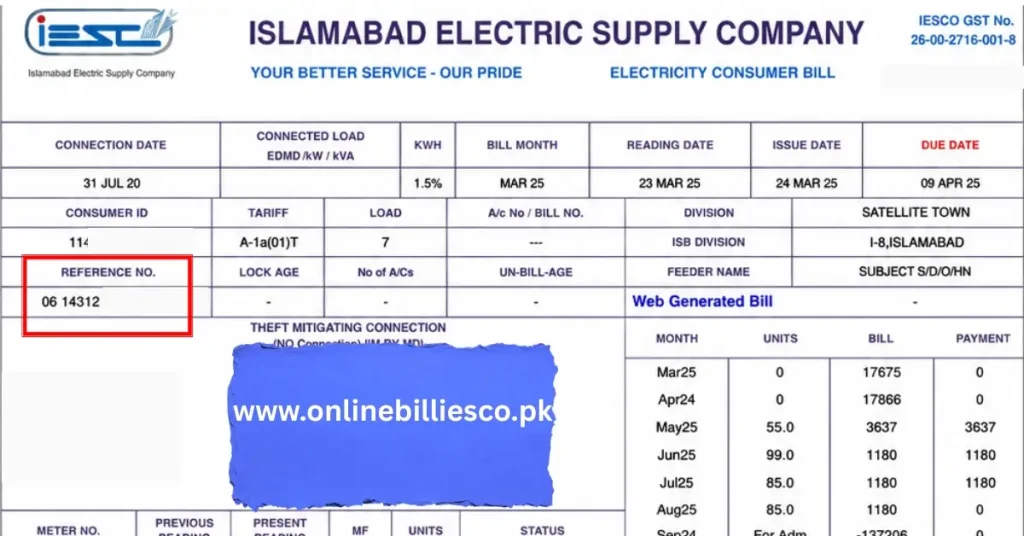
You will need to enter your reference number to find your bill. You can also find your reference number on the previous monthly bill you received from the power supply company, printed on the top right or top left of the bill.
Step 2: Locate Your Consumer ID
The Consumer ID is mentioned in the top-left corner of the bill. Use a 10-digit consumer ID number for checking your bill.
Step 3: Enter the Number on the Portal
If you already know your reference number, then follow these steps: Visit the official IESCO website or our website to check bills. Check the box labeled Reference Number, then enter your 14-digit number without spaces. Some online portals ask for the customer ID number, whereas the reference number is mandatory.
Step 4: View, Print, and Download
After entering the number, click on the Check Bill button. The system will automatically open your current month’s bill. Review your bill and check the due date, the payable amount, and other details. Save and download the duplicate bill, and also print it for legal purposes.
How to Find the Reference Number Without the Old Bill?
If you are unable to find the reference number of your bill, find it on the official website of IESCO. Follow the steps below:
Contact IESCO for Billing Support
Contact the IESCO helpline at 051-9252937-8, the UAN at 111-390-390, or call 118 to reach a customer service representative and explain your issue. Give them your name, address, and CNIC number, and they will provide you with the reference number.
Visit the Nearest IESCO Office
Go to your nearest IESCO office. Ask them to check the reference number on their official website. They will ask you for some details related to your address and CNIC. They will provide you with a number after checking on their website.
Check from your Mobile and Bank App
If you are already paying your bill through a mobile wallet app or banking app, check the previous transaction record in your app.
How to Check IESCO Bill Online via SMS and Email
| Method | Procedure | Required Info | What You Get |
|---|---|---|---|
| SMS Service | Type your electricity reference number in a message and send it to the official IESCO SMS service | 14-digit reference number | A reply message showing your current bill amount and due date |
| Email Service | Sign up for email billing with IESCO through their system or office | Reference number + valid email | Your bill is delivered to your email every month automatically |
How to Pay Your IESCO Bill
Pay your bill easily through a variety of payment methods, some of which are listed below:
Online and Digital Payment Options
Mobile Banking Apps
All Pakistani banks allow their users to pay bills through their apps.
Internet Banking Web Portals
Log in to pay your bills.
ATM Machine
Some ATMs allow paying bills.
Digital Wallets
Use the JazzCash and Easypaisa apps for convenient bill payment.
Offline Payment Options
Bank Branches: Visit your nearest bank branch and pay the bill.
Pakistan Post Offices: Pay your bills at a Pakistan post office near your location.
IESCO Bill Management Guide
Managing your bills is quite easy. Follow these steps, and you will handle them properly:
- Review your IESCO bill online each month and check it thoroughly.
- Enable email and SMS notifications on their page and receive reminders before the bill’s due date.
- After paying the amount, track your bill to ensure that there is no balance left.
Understanding Your IESCO Online Duplicate Bill
Whether you check the IESCO duplicate bill online or offline, it has details of the electricity usage. It includes different factors that are important to know when you are checking the IESCO bill online:
- Consumer Details: Name, address, and meter connection type.
- Meter Reading: Your previous and current month’s readings are listed on the bill.
- Tariff rate: the cost per consumption unit is mentioned on the bill.
- Taxes and Surcharges: Duty, Fuel Adjustment Charges, and GST charges are mentioned on the bill.
- Payment Dates: Clearly mention the Due Date and the amount, including a late fee if it is past the due date.
What is IESCO?
The Islamabad Electric Supply Company (IESCO) was established in 1998 following WAPDA’s unbundling.
IESCO provides electricity to various sectors, including agriculture, commerce, and domestic use. Millions of customers are satisfied with its high standard of service and their access to digital services.
Area of Operations
IESCO operates in the capital territory and the Northern Punjab region, such as:
Islamabad
High demand for commercial and residential electricity in the capital.
Rawalpindi
A commercial and industrial center, requires a large amount of power.
Attock
The agriculture and industrial sectors require energy in this region.
Chakwal
Rural areas and the cement industry demand a huge amount of power.
Jhelum
Growing demand for power supply in both rural and urban areas.
IESCO manages all the power supply challenges and energy shortages to meet the needs of its customers in the region. It also upgrades its infrastructure and grid networks to improve the power supply. See the latest IESCO tariff rates for your region.
🔌 Need a New Connection?
If you are building a new home or shop in Islamabad, Rawalpindi, Attock, Chakwal, or Jhelum and need electricity for the first time, you don’t have to visit the office in person. Simply apply online for an IESCO new connection. This process explains everything from the required documents to the meter installation timeline.
Common Issues and How to Fix Them
Sometimes your bill may look incorrect, with errors that seem minor but cause you a lot of stress. Cross-check your bill and fix it.
Wrong Meter Reading
Sometimes the meter reader entered higher units or lower units than the actual ones.
Fix: Check your meter and compare it with your IESCO bill online or offline.
Extra Units Charged
Due to wrong data entry, units may be miscalculated or overcalculated.
Fix: Again, calculate the units consumed in the month, and check the meter.
Double Charges or Duplicate Bill
Sometimes, due to a system fault, it may generate duplicate IESCO bills online or double charges.
Fix: Contact their helpline and ask them to resolve the problem.
Incorrect Tariff Applied
Tariffs differ across the commercial, domestic, and industrial sectors. An overcalculated unit means an extra amount to pay.
Fix: Check your tariff type and correct it.
Arrears Not Cleared
Occasionally, the bill shows your previous arrears as part of the total payable amount of the new bill.
Fix: Contact the IESCO helpline and provide proof of payment for the bill.
How to Contact IESCO for Billing Support
IESCO offers a variety of options for consumers to contact them regarding issues related to the bill, such as a duplicate bill, an incorrect meter reading, or a supply problem. Contact them in these ways as follows:
- Online Portal: Visit their online portal and submit a complaint.
- Helpline: Contact 118 and report the issue to a customer service representative.
- Customer Service Center: Visit their physical office, tell the complaint desk the IESCO reference number, and check the IESCO bill.
- Social Media: Follow their social media channels for updates on the IESCO bill check.
IESCO Tariff and Understanding Tariff
| Category | Detail |
|---|---|
| Uniform Tariff | Government standard tariff across Pakistan. Same base rates as the above categories, adjusted via subsidies so all DISCOs (including IESCO) follow similar pricing. |
| Domestic | Residential users. Slab-based system. Approx rates: Protected (Rs. 3.95 – 14.16/unit), Non-Protected (Rs. 23.59 – 48.84/unit), depending on units consumed. |
| Commercial | Shops & businesses. Approx rate: Rs. 37 – 43/unit. TOU users: Peak ~Rs. 43.82, Off-Peak ~Rs. 35.15. |
| Industrial | Factories & industries. Lower than commercial. Approx rate: Rs. 30 – 38/unit (varies by load & TOU). |
IESCO Peak Hours
| Type | Time | What it means for the customer |
|---|---|---|
| Peak Hours | 5 PM – 11 PM | Electricity is expensive. Using heavy appliances (AC, iron, heater) will increase your bill. |
| Off-Peak Hours | Remaining hours | Electricity is cheaper. The best time to use heavy appliances is to save money. |
Meter Reading and Billing for IESCO Customers
Want to know how your electricity bill is calculated? First, understand the billing system and meter reading to better understand the calculation process. You can also estimate your bill in seconds with our calculator. Follow the points below:
- Parts of Bill: Taxes, Cost, and Fuel Adjustment Price
- Types of Meter and Note the Reading: Check the kW reading on the analog, digital, and smart meters.
- Meter Reading: Monthly, a meter reader comes and records the meter reading.
- Checklist of Users: Keep a record of your monthly reading, check extra taxes, and complain if there is any issue.
Frequently Asked Questions
Whether you are a business owner in Islamabad, a resident of Rawalpindi, an agrarian consumer in Jhelum, or have a commercial setup in the Chakwal region, checking bills online in 2026 is convenient for you, and the IESCO bill online service is best for this purpose. Enter your 14-digit reference number, download a duplicate of your bill, and confirm your payment before the due date.